

Composing an Adapter#
Overview#
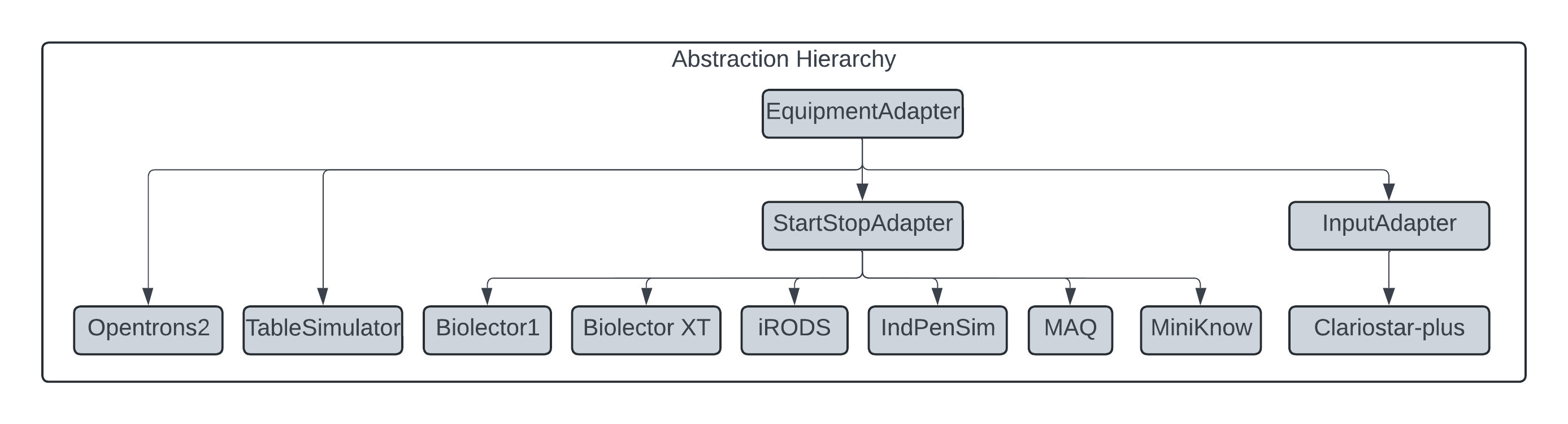
Equipment Adapters are containers of modules (and an interpreter) that, when joined, can take new information from equipment, transform it into a standard structure, and output or store it. By design, a new adapter is composed of reusing existing modules, and unlike developing interpreters, the process is more deterministic. At this point, it is assumed how adapters are structured and run as described in the For Developer section. This document provides guidelines for composing an adapter from existing components. It must be noted and seen within Figure 5 that intermediate generic adapters such as the ContinuousExperimentAdapter exist, which makes composing similar adapters trivial as connecting input events to topics is not required (see templates for examples). However, for completeness in this example, an adapter will inherit from the base class (EquipmentAdapter) to provide an end-end example of what is needed.
Figure 5: Hierarchy
This figure displays the hierarchy of adapters. All adapters are derived from the original EquipmentAdapter, but intermediate adapters are available for common processes. For example, ContinuousExperimentAdapter is an adapter that implements the process for discrete experiments (Experiments that have defined starts and ends).
Requirements#
EquipmentAdapter: An adapter must subclass the
EquipmentAdapterbase class or a derivative ofEquipmentAdapter.InputModule: An adapter must have the appropriate
InputModuledepending on how the equipment presents its data.OutputModule: An adapter must be able to take an
OutputAdapterinstance.Interpreter: An adapter must implement its own Interpreter to handle the equipment’s unique data structure.
ProcessModules: An adapter must compose one or more
ProcessModulesto define the equipment’s related actions.Error Handling: Utilise
ErrorHolderfor error management.Metadata: Information about the Equipment.
This section provides a step-by-step guide on how an Adapter can be composed. These guidelines provide the best practices for creating an adapter that will provide the best outputs but depends on the developer. This simple example is a piece of continuous equipment, i.e. it takes measurements and does not have distinct phases. Furthermore, it writes measurements to a database. Note, the example code is listed at the end of this section.
1. Subclass the EquipmentAdapter#
Begin by creating a new class inheriting from EquipmentAdapter OR form an existing derivative class (see an end-end example of an adapter that inherits from the ContinuousExperimentAdapter derived class). This inheritance structure standardises the interface and enables the reuse of core adapter functionality. During initialisation, the EquipmentAdapter will be provided (by LEAF) with several components from the configuration (see Guidelines for defining configuration). It must be noted that although each parameter is briefly described below, most are passed to the base class and don’t need any manipulation within the constructor.
instance_data: A dictionary containing data specific to the equipment instance (e.g., physical setup or configuration parameters).
output: An OutputModule instance responsible for transmitting data collected from the equipment to external systems or clients. The OutputModule is instantiated outside the adapter to allow for reusability.
Adapter-specific parameters: Some adapters may need extra information, such as filenames or credentials. Derived adapters, therefore, can have any parameters defined by the developer.
error_holder: An optional ErrorHolder instance to capture and log errors, helping to diagnose issues without interrupting the adapter’s operation. This parameter must be present but doesn’t require any processing within this class (it must be passed to the base class).
maximum_message_size: Sets the maximum number of measurements in one output message. This parameter must be present but doesn’t require any processing within this class (it must be passed to the base class).
experiment_timeout: The maximum time between measurements in an experiment before an error is sent. This parameter must be present but doesn’t require processing within this class (it must be passed to the base class).
external_watcher An optional argument that, when provided, is a derived
InputModulewhich can take information from external sources (not the equipment being monitored). This is the entry point for commands to be sent back to the adapter by analysis tools.
2. Defining instance data#
When defining adapters, metadata is required to build unique namespaces, enabling the adapter system and client tooling to identify the equipment. The JSON below shows the current structure of a device.json metadata file. The only mandatory top-level keys are adapter_id and requirements.
The adapter_id provides a unique identifier for the equipment, allowing data from the adapter to be correctly associated within the broader infrastructure (e.g., the MQTT broker and client tools).
The requirements section defines the parameters to be provided when constructing the adapter. The requirements are the unique parameters for the adapter where the key is identical to the parameter name, and the value is the type (int, str, etc.).
The equipment_data section is optional and can include any arbitrary metadata describing the equipment’s capabilities or characteristics.
Adapter_data is reserved for describing the adapter’s internal composition, but it is not currently used.
This metadata must be stored in a file named device.json in the adapter’s directory.
  {
      "adapter_id": "CustomEquipment",
      "equipment_data": {
          "version": "1.0",
          "manufacturer": "m2p-labs GmbH",
          "device_type": "Microbioreactor",
          "application": "High-throughput cultivation and analysis",
          "features": {
              "multi-parallel_cultivation": true,
              "real_time_monitoring": true,
              "optical_density_measurement": true,
              "fluorescence_detection": true,
              "pH_measurement": true,
              "oxygen_measurement": true,
              "temperature_control": true,
              "shaking_speed_control": true
          }
      },
      "requirements": {
          "interval" : "int",
          "custom_parameter" : "str"
      },
      "adapter_data": {}
  }
A special MetadataManager class is present to handle the equipment metadata. This manager is critical for generating unique topics and tracking equipment. This manager should be initialised and then passed to the superclass. Finally, the add_equiment_data function should be called, and this file
3. Initialising the InputModule#
Different equipment presents information in different ways. The LEAF system contains several Input Modules, one of which can be used depending on the system’s specification. In this example, the db_watcher is a simple InputModule that polls a database at intervals to check for changes. Derivatives of the InputModule will likely require some unique information (in this pseudo case, the interval between polls), which a user of the adapter will define in the configuration file; LEAF will pass to this adapter via arguments and then are passed to the instance of the module in this constructor.
Module Types#
The following modules are available for use. The list is not exhaustive, and new modules can be created as needed.
csv_watcher
The CSV watcher monitors a CSV file for changes. It reads the file when a change is detected and triggers the appropriate callbacks. This is useful for applications where data is logged in a line based format.
file_path (str): Path to the CSV file to monitor.
metadata_manager (MetadataManager): Metadata manager for experiment and instance metadata.
callbacks (Optional[List[EventCallback]]): Callback functions triggered on file events.
error_holder (Optional[ErrorHolder]): Optional error handler to capture and manage exceptions.
delimiter (str): Delimiter used in the CSV file (default is “;”).
file_watcher
Monitors a specific file for creation, modification, and deletion events. Utilises the watchdog library for event monitoring and triggers callbacks for each event type.
path (str): Path to the file or directory to monitor.
metadata_manager (MetadataManager): Metadata manager for associated data.
callbacks (Optional[List[Callable]]): Callbacks for file events.
error_holder (Optional[ErrorHolder]): Optional error holder for capturing exceptions.
http_watcher
Tracks ETag, Last-Modified, and response body to detect whether a new API response is worth processing.
metadata_manager (MetadataManager): Metadata manager instance.
measurement_url (str): Required URL to poll for measurements.
start_url (Optional[str]): Optional URL to detect start events.
stop_url (Optional[str]): Optional URL to detect stop events.
interval (int): Polling frequency in seconds.
headers (Optional[Dict[str, str]]): Custom headers to include in all requests.
callbacks (Optional[List[Callable]]): Callback functions to execute on data updates.
error_holder (Optional[ErrorHolder]): Optional error management object.
mqtt_external_event_watcher / mqtt_watcher
Subsribes to specific topics on an MQTT broker and triggers callbacks when messages are received. This is useful for monitoring external events or commands.
metadata_manager (MetadataManager): Metadata manager instance.
broker (str): MQTT broker address.
topics (List): List of topics to subscribe to.
port (int); Port number for the MQTT broker.
username (Optional[str]): Username for MQTT authentication.
password (Optional[str]): Password for MQTT authentication.
clientid (Optional[str]): Client ID for MQTT connection.
protocol (Literal[“v3”, “v5”]): MQTT protocol version.
transport (Literal[“tcp”, “websockets”, “unix”]): transport protocol to use.
tls (bool) Optional TLS flag.
callbacks (Optional[List[Callable]]): Callback functions to execute on data updates.
error_holder (Optional[ErrorHolder]): Optional error management object.
opc_watcher
A concrete implementation of the opcua-watcher. This module monitors OPC UA servers for changes in data and triggers callbacks when updates occur.
metadata_manager (MetadataManager): Metadata manager instance.
host (str): Hostname or IP address of the OPC UA server.
port (int): Port number for the OPC UA server.
topics (set[str]): Topic to monitor for changes.
exclude_topics (set[str]): Topics to exclude from monitoring.
callbacks (Optional[List[Callable]]): Callback functions to execute on data updates.
error_holder (Optional[ErrorHolder]): Optional error management object.
simple_watcher
A minimal polling watcher that simulates static data for development and testing purposes. Useful for mocking inputs or demonstrating flow.
metadata_manager (MetadataManager): Equipment metadata manager.
interval (int): Polling interval in seconds.
callbacks (Optional[List[Callable]]): Callbacks for simulated events.
error_holder (Optional[ErrorHolder]): Optional error handling instance.
4. Constructing ProcessModules and PhaseModules#
As described previously, ProcessModules are the container classes for specific processes in the equipment, such as an experiment process. Within ProcessModules, PhaseModules exist, which describe a particular action within the equipment, such as taking a measurement. Adding phases is critical as it maps physical events to actions within the adapter. In this simple case, the system is defined as having a single process, i.e., it is a piece of equipment that takes measurements and does not have discrete starts and ends of experiments or any extra processes. Therefore, MeasurementPhase is provided as a parameter with an InitialisationPhase that is REQUIRED for discovering the adapter. Behind the scenes, the PhaseModules are attached to the InputModules as callbacks. Then, when an Event occurs, the InputModule calls the ProcessWatcher with the action topic, which the ProcessWatcher dispatches to the appropriate phase.
5. Interpreters#
The Interpreter is all the code that is specialised for interpreting the unique form of data presented. This topic is described in detail here. However, the Interpreter must be initialised and passed to the superclass for composition.
6. Initialise the superclass#
After defining these components, initialise the EquipmentAdapter superclass with instance_data, InputModule, ProcessModule(s), Interpreter, metadata_manager, and error_holder, experiment_timeout, maximum_message_size and external_watcher.
from typing import Optional
import os

from leaf_register.metadata import MetadataManager

from leaf.modules.process_modules.discrete_module import DiscreteProcess
from leaf.modules.phase_modules.measure import MeasurePhase
from leaf.modules.phase_modules.initialisation import InitialisationPhase
from leaf.modules.output_modules.output_module import OutputModule
from leaf.modules.input_modules.external_event_watcher import ExternalEventWatcher
from leaf.modules.input_modules.db_watcher import DBWatcher

from leaf.adapters.equipment_adapter import EquipmentAdapter
from leaf.error_handler.error_holder import ErrorHolder

current_dir = os.path.dirname(os.path.abspath(__file__))
metadata_fn = os.path.join(current_dir, "device.json")

class CustomEquipmentAdapter(EquipmentAdapter):
    def __init__(self,
                instance_data: dict,
                output: OutputModule,
                interval: int,
                custom_parameter: str,
                error_holder: Optional[ErrorHolder] = None,
                maximum_message_size: Optional[int] = 1,
                experiment_timeout: Optional[int] = None,
                external_watcher: ExternalEventWatcher = None):


        metadata_manager = MetadataManager()
        watcher = DBWatcher(metadata_manager,interval)

        measure_p = MeasurePhase(output, metadata_manager)
        details_p = InitialisationPhase(output, metadata_manager)
        process = [DiscreteProcess([measure_p,details_p])]

        interpreter = CustomEquipmentInterpreter(error_holder=error_holder)
        super().__init__(
            instance_data,
            watcher,
            process,
            interpreter,
            metadata_manager=metadata_manager,
            error_holder=error_holder,
            experiment_timeout=experiment_timeout,
            maximum_message_size=maximum_message_size,
            external_watcher=external_watcher
        )

        self._custom_parameter = custom_parameter
        self._metadata_manager.add_equipment_data(metadata_fn)
6. Simulate (Optional)#
Adapters can optionally simulate data to assist with testing the adapter and larger system without running the equipment physically. Just as this system is completely optional, so are the implementation details. For example, the simulation process can be implemented in adapter.py OR interpreter.py. The goal is to insert the data into the medium the InputModule monitors. For example, extending the working example, the simulate function within the adapter.py starts the adapter thread, i.e. starts the monitoring, instructs its interpreter to begin simulation (see here, deletes the watch file once finished and then stops the adapter. The arguments depend on the information needed and must be matched within the config file.
    def simulate(self, filepath, wait) -> None:
        adapter_thread = Thread(target=self.start)
        adapter_thread.start()

        self._interpreter.simulate(filepath, self._write_file, wait)
        time.sleep(wait)

        os.remove(self._write_file)

        self.stop()
        adapter_thread.join()