

Alarms#
URL: /alarms
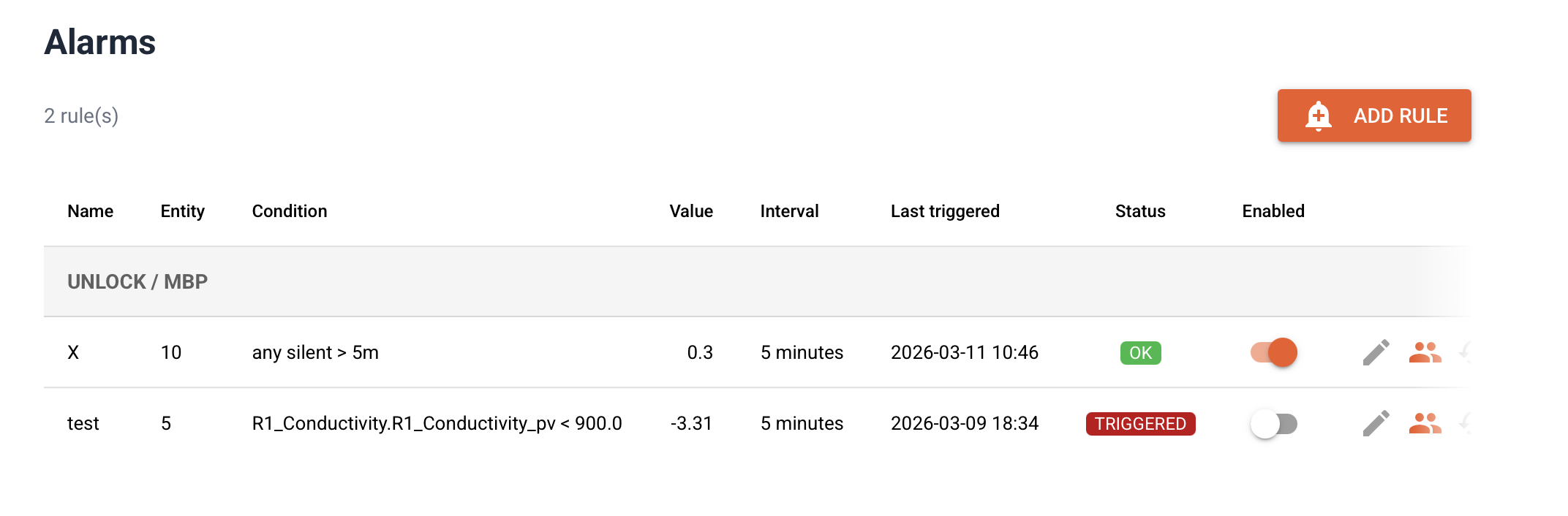
The alarms page lets you define rules that trigger email notifications when sensor data crosses a threshold or when a sensor stops sending data entirely.
Concepts#
Term |
Meaning |
|---|---|
Alarm rule |
A named condition that is evaluated on a schedule |
Check interval |
How often the rule is evaluated (1 min – 1 hour) |
Trigger |
The rule condition is met — a notification is sent |
Resolve |
The condition is no longer met — a resolve notification is sent |
Recipient |
A user who receives the email when the rule triggers |
Rules are grouped by department in the overview table.
Rule types#
Threshold#
A threshold rule triggers when the most recent value of a metric satisfies an operator condition:
metric <operator> threshold
Supported operators: <, >, <=, >=, =
Example: trigger when temperature > 30
No data (silence)#
A no-data rule triggers when no data has been received for an entity (or a specific metric on that entity) for longer than a configurable number of minutes.
This is useful for detecting sensor outages or connectivity problems.
Example: trigger when entity R1 has been silent for > 60 minutes
If no metric is specified, the rule checks whether the entity has sent any metric at all. If a specific metric is set, only that metric is monitored.
Creating a rule#
Click Add rule.
Enter a descriptive name.
Select the department.
Select the entity (sensor).
Choose the operator:
For threshold rules: select
<,>,<=,>=, or=, then enter the threshold value.For no-data rules: select
no data, then enter the silence timeout in minutes.
For threshold rules: select the metric.
Set the check interval.
Click Save.
After saving, click the people icon on the rule row to add recipients.
Managing rules#
Action |
Icon |
Description |
|---|---|---|
Edit |
✏ |
Change rule parameters |
Recipients |
👤 |
Add or remove email recipients |
History |
🕐 |
View the last 50 triggered/resolved events |
Delete |
🗑 |
Delete the rule and all its events |
Rules can be temporarily disabled with the toggle in the Enabled column without deleting them.
Notifications#
When a rule triggers, all recipients receive an email with:
The rule name
The entity and metric
The condition and value (threshold) or silence duration (no data)
The timestamp of the last received value
A second email is sent when the condition resolves (value returns to normal, or data resumes).
Email delivery requires SMTP to be configured in Settings.
Permissions#
Any user associated with a department (via department membership) can create and manage alarm rules for that department. Superadmins can manage rules for all departments.